FrontPong
FrontPong
Publisher: (Unknown)Genre: Breakout/Pong
Programmer: Commodore Spain
Year: 2026
Uploaded by: admin
Language: English / Spanish
Downloads: 10
Website: Commodore Spain
Download
Download
Log in with a member account to improve this entry.
We do not own the rights to any of the software
Game input holds PET matrix keys down until you physically release them, which is best for arcade games. Type input keeps the original short-tap queue for entering BASIC commands.
Charset Auto lets PET software switch normally. Graphics or Business forces the selected character ROM for compatibility/testing.
Changing RAM or ROM resets the PET. Some programs need ROM2/ROM4 or 16K/32K.
The sound slider controls the emulated PET VIA speaker. Modern browsers require a click before audio can start, so Start Game also enables audio.
The emulator has an IEEE-488 device at address 8 for loading/saving .prg files. D64 disk images can also be inspected for PRG files.
70%
Ready.
Game Notes
Title: FRONTPONG (vs 1.0)
Developer: Commodore Spain
Release: February 2026
Platform: Commodore Pet
INFORMATION:
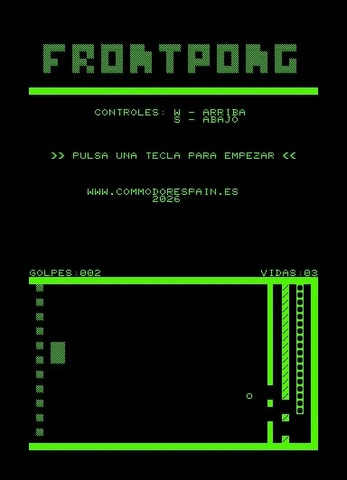
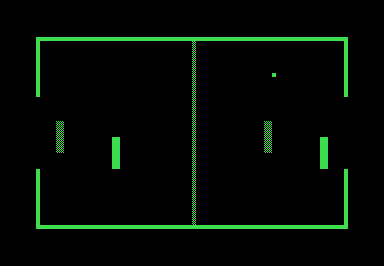
Frontpong is a very simple game with no other aim than to learn how to create a small game for the Commodore Pet, released in 1977.
The game is optimized for the Commodore Pet 4032, programmed in BASIC, and based on the concept of the classic Pong games.
CONTROLS:
Its controls are simple: press (W) up and (S) down to move the paddle continuously.
EXTRAS:
This is a small project we developed as a test, without any grand ambitions, but with the desire to create something "new" for the Pet. If it also inspires someone or sparks the desire to do something similar, then mission accomplished!
It's a project we wanted to learn and experiment with a bit. Even so, we didn't want it to just sit in a drawer, so we decided to share it here.
VERSION:
FrontPong 1.0
Developer: Commodore Spain
Release: February 2026
Platform: Commodore Pet
INFORMATION:
Frontpong is a very simple game with no other aim than to learn how to create a small game for the Commodore Pet, released in 1977.
The game is optimized for the Commodore Pet 4032, programmed in BASIC, and based on the concept of the classic Pong games.
CONTROLS:
Its controls are simple: press (W) up and (S) down to move the paddle continuously.
EXTRAS:
This is a small project we developed as a test, without any grand ambitions, but with the desire to create something "new" for the Pet. If it also inspires someone or sparks the desire to do something similar, then mission accomplished!
It's a project we wanted to learn and experiment with a bit. Even so, we didn't want it to just sit in a drawer, so we decided to share it here.
VERSION:
FrontPong 1.0
.JPG)
.JPG)
.JPG)